
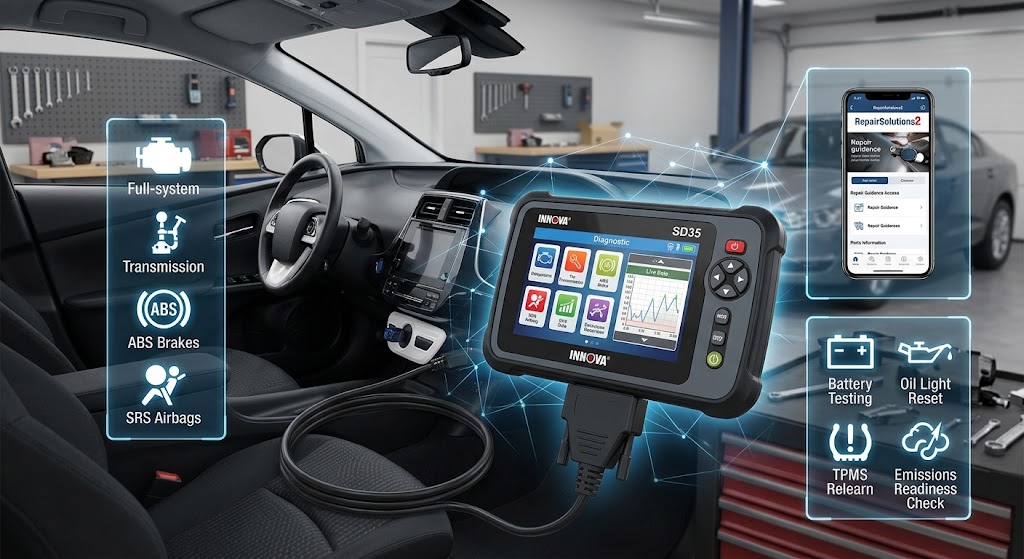
Modern cars are packed with computers, sensors, and electronic control modules. When a warning light appears on the dashboard, the problem may be much more complicated than it looks. That is where a diagnostic scanner can make a real difference.
The Innova SD35 is an all-system OBD2 diagnostic tablet designed for vehicle owners, DIY enthusiasts, and people who want more information before visiting a repair shop. Rather than focusing only on the engine, it can access several important vehicle systems and provide live information, diagnostic trouble codes, service functions, and repair guidance.
So, what does it actually do, who is it designed for, and what should you know before buying one? Let’s take a detailed look.
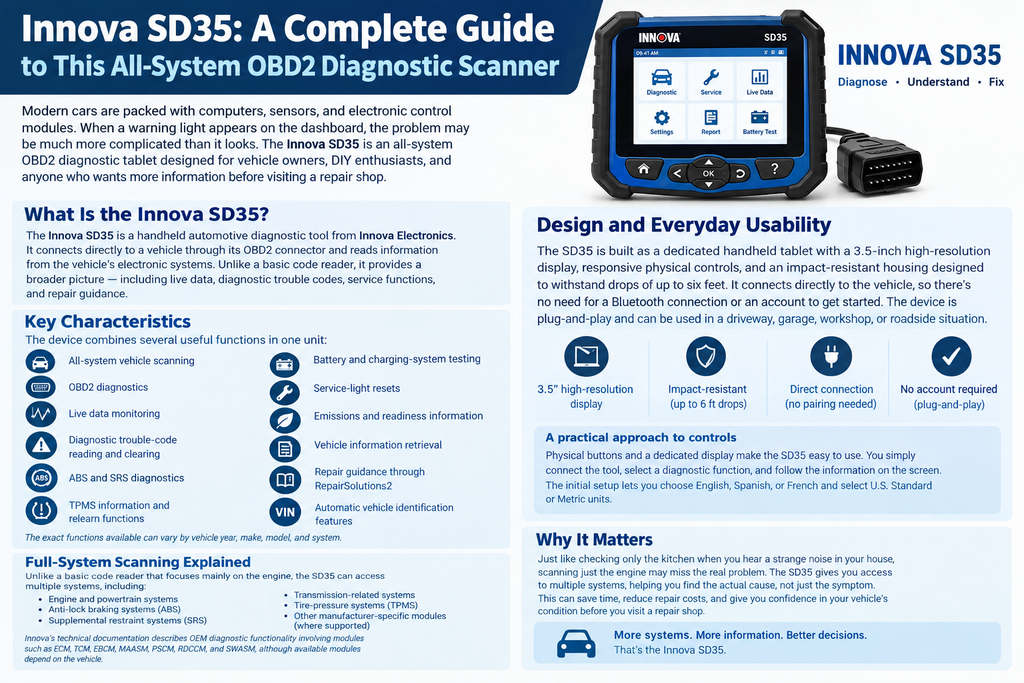
What Is the Innova SD35?
The Innova SD35 is a handheld automotive diagnostic tool from Innova Electronics. It connects directly to a vehicle through its OBD2 diagnostic connector and is designed to read information from the vehicle’s electronic systems.
Unlike a basic code reader that may simply tell you that a fault code exists, the SD35 is intended to provide a broader picture. According to Innova, it can scan systems including the engine, ABS, SRS airbags, transmission-related modules, and TPMS, with available functions depending on the particular vehicle.
Think of the scanner as a translator between you and your car. Your vehicle’s computers communicate through electronic codes and data streams that can be difficult for an ordinary driver to understand. The scanner helps turn some of that information into something you can actually use.
The company positions the SD35 toward entry-to-mid-level DIY users who want to investigate problems themselves. It is also relevant to people who regularly perform maintenance or want to understand a vehicle’s condition before paying for repairs.
Key characteristics
The device combines several useful functions in one unit:
- All-system vehicle scanning
- OBD2 diagnostics
- Live data monitoring
- Diagnostic trouble-code reading and clearing
- ABS and SRS diagnostics
- TPMS information and relearn functions
- Battery and charging-system testing
- Service-light resets
- Emissions and readiness information
- Vehicle information retrieval
- Repair guidance through RepairSolutions2
- Automatic vehicle identification features
The exact functions available can vary by vehicle year, make, model, and system.
Design and Everyday Usability
A diagnostic scanner can have impressive technical capabilities, but none of that matters much if it is frustrating to use. The SD35 is designed as a dedicated handheld tablet rather than relying entirely on a phone.
Innova lists a 3.5-inch high-resolution display, responsive physical controls, and an impact-resistant housing designed to withstand drops of up to six feet.
That matters because automotive tools live in a demanding environment. They may be used in a driveway, garage, workshop, or roadside situation where clean hands and perfect conditions are not guaranteed.
The physical design also eliminates one common inconvenience associated with wireless diagnostic devices: pairing.
The SD35 can be connected directly to the vehicle and used without depending on a Bluetooth connection for its basic diagnostic operation. Innova describes the device as plug-and-play and says users do not need an account simply to start diagnosing with the scanner.
A practical approach to controls
For someone unfamiliar with vehicle diagnostics, physical buttons and a dedicated display can be reassuring. You are not switching between a phone’s Bluetooth settings, an application, and the vehicle.
You connect the tool, select the appropriate diagnostic function, and work through the information shown on the screen.
The initial setup allows users to choose English, Spanish, or French and select either U.S. Standard or Metric units.
Full-System Scanning Explained
One of the main reasons people consider the SD35 instead of a simple code reader is its broader system coverage.
A basic scanner may concentrate primarily on the engine and emissions system. That can be useful when the check-engine light is illuminated, but modern vehicles contain many other electronic modules.
The SD35 is designed to access multiple systems, including:
- Engine and powertrain systems
- Anti-lock braking systems
- Supplemental restraint systems
- Transmission-related systems
- Tire-pressure systems
- Other manufacturer-specific modules where supported
Innova’s technical documentation describes OEM diagnostic functionality involving modules such as ECM, TCM, EBCM, MAASM, PSCM, RDCCM, and SWASM, although available modules depend on the vehicle.
Why does that matter?
Imagine hearing a strange noise from your house and checking only the kitchen. You might find something, but you could miss the real problem elsewhere. A modern vehicle is similar. A warning light or symptom does not always tell you which electronic system contains the underlying fault.
Full-system scanning gives you a wider view.
ABS and airbag diagnostics
Brake and airbag systems deserve particular attention because they relate directly to vehicle safety.
The SD35 can read ABS and SRS diagnostic information on supported vehicles. This can help identify stored fault codes associated with these systems.
However, reading a code is not the same thing as repairing the problem. A diagnostic code should be treated as a clue rather than an automatic instruction to replace a particular part.
That distinction is important for anyone new to vehicle diagnostics.
Live Data: Looking at the Car in Real Time
One of the more useful features for troubleshooting is live data.
Instead of looking only at a stored fault code, a scanner can display information being reported by sensors while the vehicle is operating.
The SD35 supports live data and can graph or record certain data streams. Innova lists examples such as:
- Engine coolant temperature
- Intake-air temperature
- Mass airflow
- Oxygen-sensor information
- Throttle position
- Engine speed
- Fuel level
- Fuel trim
- Calculated engine load
- Intake manifold pressure
This can be especially helpful when a problem occurs intermittently.
Suppose your vehicle hesitates occasionally but runs normally when you take it to a mechanic. A stored code might provide one piece of the puzzle, but live readings can sometimes reveal unusual sensor behavior while the problem is happening.
Why graphing can help
Numbers alone can be difficult to interpret.
If you see a series of values changing on a screen, it may not immediately mean anything. A graph, however, can make patterns easier to recognize.
For example, a sensor that normally changes smoothly might show an unusual spike, drop, or inconsistent response. That does not automatically prove that the sensor is defective, but it gives you another piece of evidence to investigate.
This is one of the places where the SD35 becomes more than a simple “check-engine-light reader.”
Diagnostic Trouble Codes and Repair Information
When an electronic control module detects something outside an expected range, it can store a diagnostic trouble code, commonly called a DTC.
The SD35 can read and erase supported codes and display additional diagnostic information. Its OBD2 functions include reading DTCs, clearing them, viewing freeze-frame information, checking readiness status, and accessing live data.
But what happens after you get the code?
This is where the optional RepairSolutions2 integration becomes important.
Innova says RepairSolutions2 can provide likely causes, repair tips, and verified repair information associated with diagnostic codes. The company’s documentation says the information draws on solutions from ASE-certified technicians.
That can make the experience more approachable for someone who is not a professional technician.
A code is not a diagnosis
This point deserves emphasis.
If a scanner displays a code relating to an oxygen sensor, for example, that does not necessarily mean the sensor itself has failed. Wiring, connectors, air leaks, fuel-related problems, or other conditions can sometimes cause a system to report a related fault.
A scanner is therefore best viewed as an investigative tool, not a magic answer machine.
The more information you combine—fault codes, symptoms, live data, visual inspection, service information, and appropriate testing—the stronger your diagnosis becomes.
Service Resets and Maintenance Functions
Another useful aspect of the SD35 is its service-oriented functionality.
According to Innova’s current documentation, the tool provides access to workshop functions such as oil maintenance reset, battery reset, battery initialization, battery/alternator testing, and TPMS relearn.
The broader SD35 feature information also lists functions such as battery and charging-system tests and service-light resets.
These functions can be useful after completing appropriate maintenance.
For example, imagine replacing a battery in a vehicle that requires battery-management-system initialization. Simply installing the new battery may not complete the vehicle’s required procedure. If the SD35 supports that particular function for the vehicle, it can provide an additional step in the service process.
Similarly, TPMS-related functions can be useful when servicing tires or sensors, provided the vehicle and specific procedure are supported.
Vehicle compatibility matters
This is where users should avoid assumptions.
A scanner can advertise a large number of functions while a particular vehicle may support only some of them. Automotive manufacturers implement systems differently, and capabilities can vary by model year and trim.
Innova states that the SD35 works with most OBD2-compliant vehicles, including cars, light trucks, SUVs, and hybrids made after 1996, but also notes that functions vary according to the vehicle.
Checking compatibility before purchasing is therefore a sensible step.
Emissions and Readiness Checks
If you’ve ever needed a vehicle emissions inspection, you may already know how important readiness monitors can be.
The SD35 includes emissions and SMOG-readiness functions. These features can show whether certain onboard diagnostic monitors have completed their required checks.
This is particularly useful after maintenance or when preparing a vehicle for an inspection.
However, clearing diagnostic codes immediately before an emissions test can reset readiness monitors. In that situation, the vehicle may need to complete an appropriate drive cycle before the monitors return to their required state.
The SD35 can provide readiness information, but the exact inspection requirements depend on the jurisdiction.
Why readiness information is useful
Instead of guessing whether your vehicle is ready, you can check its monitor status.
That can save an unnecessary trip to an inspection station.
It also provides a clearer picture after repairs. If a fault has been addressed and the relevant monitors have completed successfully, you have more information than you would from simply switching off a warning light.
Vehicle Identification and Inspection Reports
The SD35 can retrieve vehicle information through its diagnostic connection. Innova’s knowledge base says this can include the VIN, manufacturer, model, engine information, control-module identification, calibration identification, and related information where supplied by the vehicle.
The tool also includes vehicle inspection functions.
According to Innova’s documentation, inspection reports can include diagnostic information, scan-all-systems data, service checks, and vehicle-care information. Different report types are available for different purposes.
This can be valuable when you want to document a vehicle’s condition.
For example, a vehicle owner might use diagnostic information when discussing a problem with a repair shop. A workshop could use inspection information as part of a service process.
The important point is that the scanner can help turn raw electronic information into something more organized and easier to review.
RepairSolutions2 and Smartphone Connectivity
The SD35 can work with the RepairSolutions2 application to provide additional repair information.
Innova says the application can offer likely causes, repair tips, and related information for diagnostic trouble codes. The company also describes access to vehicle-specific parts links through the service.
This creates an interesting balance.
You get a dedicated physical scanner for the core diagnostic work, while your phone can provide supplementary information when desired.
The setup documentation says users can scan a QR code from the scanner to download the RepairSolutions2 application.
For someone who dislikes complicated diagnostic equipment, this approach can make the learning curve less intimidating.
Still, repair recommendations should be treated as guidance. Before replacing a component, it is wise to verify the diagnosis through appropriate testing.
Speed, Updates, and Support
Speed matters when diagnosing a vehicle.
Nobody wants to sit beside a car for several minutes while a scanner slowly works through basic information. Innova says the SD35 can retrieve critical information in roughly 15 seconds or less under its stated testing conditions.
The company also describes automatic rescanning of vehicle monitors at approximately 30-second intervals for certain readiness-related checks.
The SD35 is also described as upgradable, and current product information lists a one-year warranty.
Innova provides manuals, tutorials, support resources, and a knowledge base for the device.
For a consumer product used to diagnose potentially expensive mechanical problems, ongoing support can be just as important as the hardware itself.
Who Should Consider the Innova SD35?
The SD35 is aimed primarily at people who want more than a basic code reader but do not necessarily need the most expensive professional diagnostic equipment.
It may make sense for:
- DIY vehicle owners
- Enthusiasts who perform their own maintenance
- Drivers who want to investigate warning lights
- Small garages
- Hobby mechanics
- People who regularly service multiple vehicles
- Users who want live data and broader system coverage
It can be especially useful for someone who has become tired of paying a diagnostic fee every time a warning light appears.
At the same time, it is important to recognize its limits.
A diagnostic scanner does not replace mechanical knowledge, wiring diagrams, manufacturer service procedures, electrical testing equipment, or professional experience. Some repairs require specialized tools or procedures that a handheld scanner cannot perform.
What about beginners?
A beginner can certainly use the SD35, particularly for reading codes and viewing basic information.
The bigger question is whether the beginner is willing to learn what the information means.
That is actually a good thing. Automotive diagnosis becomes much less mysterious once you understand the basics of codes, sensors, circuits, and system operation.
The scanner can provide the map, but you still have to understand the road.
Price and Value Considerations
The official Innova product page currently lists the SD35 at $149.99, although prices and promotions can change.
At this level, buyers are paying for considerably more than a basic engine-code reader.
The value proposition comes from combining several functions:
- Full-system scanning
- Live data
- Diagnostic-code management
- Service functions
- TPMS capabilities
- Battery testing
- Emissions information
- Vehicle identification
- Repair-information integration
Whether those capabilities justify the cost depends on how you intend to use the device.
If you only want to turn off an occasional check-engine light, a simpler scanner may meet your needs. If you want access to multiple vehicle systems and regularly work on your own cars, broader functionality becomes more valuable.
The important thing is to compare features you will actually use, rather than simply counting the number of advertised functions.
Final Thoughts on the Innova SD35
The Innova SD35 occupies an interesting middle ground between a basic OBD2 code reader and more expensive professional diagnostic equipment.
Its main attraction is breadth. Instead of concentrating solely on the engine, it can access several vehicle systems, display live information, perform supported service functions, check readiness information, and connect with RepairSolutions2 for additional repair guidance.
For the general vehicle owner, that can mean better information before making a repair decision.
Still, the SD35 should not be treated as a substitute for proper diagnosis. A code is evidence, not automatically a failed part. Compatibility also needs to be checked because available functions differ between vehicles.
Ultimately, the most useful diagnostic tool is one that helps you understand what your vehicle is telling you. In that respect, the SD35 is designed to make modern automotive information more accessible without requiring every user to own a professional workshop.
Frequently Asked Questions
1. What is the Innova SD35 used for?
The Innova SD35 is used to diagnose supported vehicle systems, read and clear diagnostic trouble codes, monitor live data, check emissions readiness, perform selected service functions, and retrieve vehicle information. It is designed primarily for DIY users and intermediate-level automotive work.
2. Does the Innova SD35 work on all cars?
It works with most OBD2-compliant vehicles, including many cars, SUVs, light trucks, and hybrids from 1996 onward. However, individual diagnostic and service functions vary by year, make, model, and system, so compatibility should be checked before relying on a particular feature.
3. Does the Innova SD35 require a subscription?
Innova states that the SD35 does not require a subscription for its diagnostic functions. The RepairSolutions2 application can provide additional information and repair guidance.
4. Can the Innova SD35 diagnose ABS and airbag problems?
Yes, on supported vehicles the SD35 can scan systems including ABS brakes and SRS airbags. It can retrieve diagnostic information from those systems, but the resulting code should still be investigated using appropriate diagnostic procedures rather than assuming a specific component has failed.
5. Is the Innova SD35 suitable for beginners?
It can be suitable for beginners because it provides a dedicated interface, guided information, and access to RepairSolutions2. However, beginners should learn the difference between reading a fault code and confirming a diagnosis. Used properly, the scanner can be a useful learning tool as well as a practical diagnostic device.